 Skip to content
 Internet Download Manager is a widely used tool for increasing and synchronizing the speeds of downloads. But did you know that it also includes an option to change the language of the website? Even if you aren’t comfortable using IDM, changing the language to one that you are comfortable with will also make it more relaxing to guide.
In this post, you will learn How to change language in IDM on Windows 7, 8, 10, 11, XP or vista in just simple and easy steps.
Why Change the Language in IDM?
As a matter of fact, Normally the language to be used in matters concerning IDM installation is selected a s a default option from the existing settings of the computer besides the geographical region in most of the times.
but not all candidates will feel relaxed to use it in Default Language. If, for instance, you are assisting your relative or you simply prefer working in another language, IDM has an option of language change. Adjusting IDM to your desired country’s language aids in easing one’s operations because all the options and settings are explained depending on the language set.
Step-by-Step Guide to Change Language in IDM
Here’s a simple way to switch the language in IDM:
Ensure that you have Internet Download Manager (IDM) Installed on your pc, laptop. if you don’t have the latest version of IDM Download and install from our website (https://idmrepack.com)
- In the current innovation, commence the IDM on you PC or Laptop.
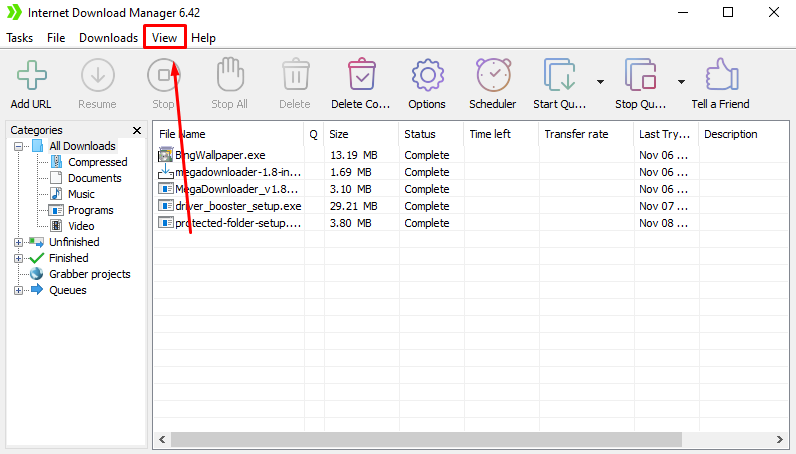
- Go to the top and click on “View” Section in the IDM navigation bar
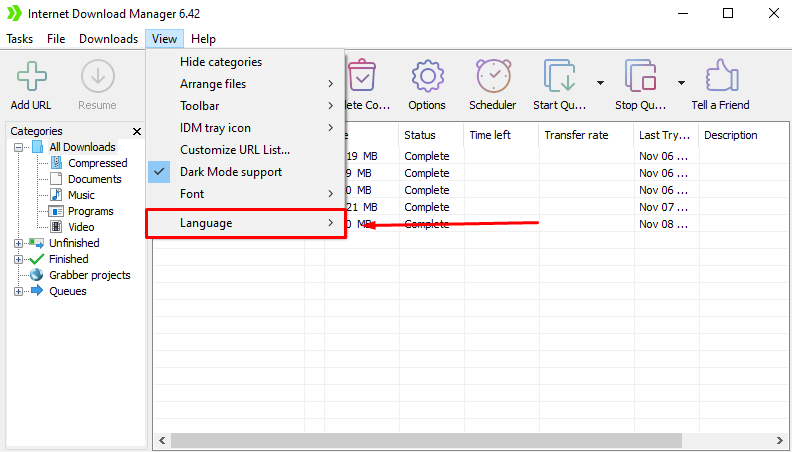
- A drop-down box will appear, move your cursor on “Language Option” here
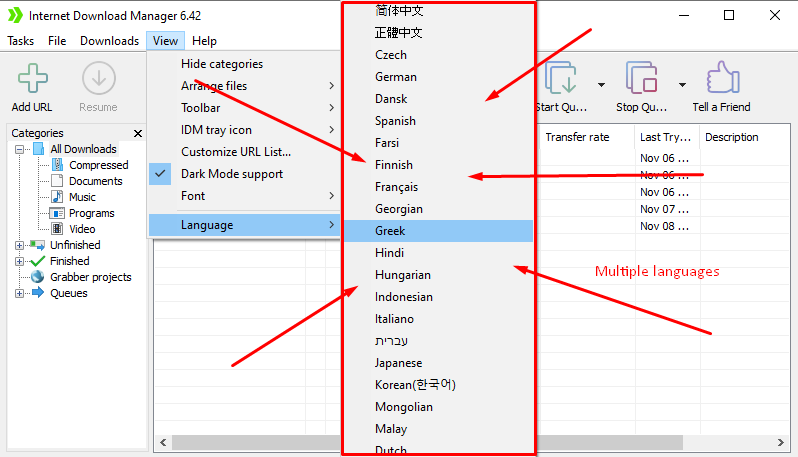
- A string containing several languages separated by crosses will be shown here: you just select the language required.
Restart IDM (if necessary):
In most cases, the new language replaces the old language on the spot. However, if you do not get the change as soon as you set it, simply shut down IDM and restart the program. Ones which have been written can underlines this fact will call for restarting so as to ensure this new language setting applies.
Supported Languages
Here’s a list of country languages supported by Internet Download Manager (IDM) along with the version and translation details:
| Language | IDM Version Translated | Translator(s) | Date Translated |
|---|---|---|---|
| Albanian | v6.22 | Isa Toska | Feb 12, 2015 |
| English | v6.42 | – | – |
| Arabic | v6.41 | Awadh A Al-Ghaamdi | Sep 14, 2023 |
| Azerbaijani | v6.38 | Ugur Eminli | Jul 31, 2020 |
| Bengali | v6.38 | Zubair | Jan 22, 2021 |
| Bosnian | v5.00 | Asmir Fejzic | Dec 08, 2005 |
| Bulgarian | v6.38 | Lyuben Panchev | Jun 28, 2020 |
| Burmese | v6.41 | Nyi Nyi Soe | Dec 12, 2022 |
| Catalan | v5.17 | Idali Vera Grau | Sep 04, 2009 |
| Chinese | v6.42 | Ke Cao | Jul 17, 2024 |
| Chinese (Traditional) | v6.39 | IMOK | Oct 16, 2021 |
| Croatian | v6.21 | Petra Breskovic | Mar 19, 2004 |
| Czech | v6.25 | Vlamo | Aug 14, 2016 |
| Danish | v6.12 | John W Hansen | Nov 12, 2012 |
| Dutch | v5.00 | Rob von Rotz | Dec 05, 2005 |
| Dutch (Belgium) | v6.41 | Hawk Soul | May 28, 2022 |
| Farsi | v6.42 | Arash Pour | Mar 18, 2024 |
| Finnish | v5.09 | CTT-Crematop translation Team | Apr 18, 2007 |
| French | v6.42 | Alain TORTOSA | Mar 25, 2023 |
| German | v6.41 | Jörg Plöger | Sep 10, 2023 |
| Greek | v6.21 | Ippokratis Giakoumis | Jan 28, 2015 |
| Gujarati | v6.41 | Kumar | May 30, 2022 |
| Hebrew | v6.41 | Yaron.S | Jul 30, 2023 |
| Hungarian | v6.28 | Zoltan Toldy | Apr 10, 2017 |
| Indonesian | v6.41 | Abe Meishandy Malik | Jun 15, 2022 |
| Italian | v6.41 | Ringo | Mar 26, 2023 |
| Japanese | v6.41 | takumi9942 | May 06, 2023 |
| Korean | v6.41 | Jaehyung Lee – KOLANP site | Oct 09, 2022 |
| Lao | v6.41 | WeiXiao Team (SHADOW) | Dec 15, 2022 |
| Lithuanian | – | Mindaugas Barkauskas | Nov 12, 2003 |
| Macedonian | – | Dimitar Mitrev | Feb 08, 2004 |
| Malay | v6.38 | MOLOKAL, Liang Piau Suk | Aug 01, 2020 |
| Mongolian | v6.32 | Нямжав Ганболд | Feb 28, 2019 |
| Norwegian | – | Lars Kaaven | Nov 26, 2004 |
| Polish | v6.42 | Dimek | Aug 07, 2024 |
| Portuguese | v6.41 | Aníbal Ribeiro | Feb 18, 2023 |
| Portuguese (Brazilian) | v6.41 | elda taluta | Sep 09, 2023 |
| Romanian | – | Alexandru DUTULESCU | Jun 29, 2003 |
| Russian | v6.41 | KSS | Sep 10, 2023 |
| Serbian (Cyrillic) | v6.15 | Ozzii | Apr 30, 2013 |
| Serbian (Latin) | v6.40 | Aleksandar Đuric, Igor M. | Jan 26, 2022 |
| Slovak | v6.41 | PESISOFT SK | Nov 22, 2023 |
| Slovenian | v5.12 | Matej Petovar | Dec 21, 2007 |
| Spanish | v6.42 | Ingrid Chumbes Padilla | Jul 17, 2024 |
| Swedish | v5.17 | Göran Malmberg | Sep 17, 2009 |
| Thai | v6.39 | Jaideejung007 | Oct 21, 2021 |
| Turkish | v6.41 | Burhan Keleş and ÇAĞATAY KAYA | Oct 03, 2023 |
| Ukrainian | v6.25 | rkononenko | Jul 17, 2016 |
| Uyghur | v6.38 | Irshat Ghalip | Dec 27, 2020 |
| Uzbek | v6.25 | Sherzod Mamatkulov | Apr 21, 2016 |
| Vietnamese | – | – |
This list includes many options, so IDM users around the world can easily change their language settings.
Troubleshooting Tips
- Language Not in List: If your preferred language isn’t available, try updating IDM. Sometimes, new languages are added in updates.
- Download Language Pack: Visit the official IDM website to check if there’s a language pack you can download.
- Reinstall IDM: If you still can’t change the language, consider reinstalling IDM. This can fix some bugs or issues with the language settings.
Benefits of Changing Language in IDM
To change the language of IDM makes it easier to navigate through mostly if you are a native or assisting someone who has poor English understanding. It can also help make it feel a little more intimate and down to earth.
In Conclusion:
This post gives a step by step guide on how to change the language of Internet Download Manager (IDM). It is easy to toggle between two languages in IDM by following the above steps I have listed above. It can help to make your user and downloading experience more easy with the right language. Here’s what, you need to do in order to continue using IDM in the language that you choose: For help, make sure to visit our IDM tutorials section. It’s possible to also use our blog to know how to solve common problem that relate to IDM serial Number.
We hope you found this tutorial helpful. Bookmark idmrepack.com for more helpful tutorials.

Hi, I check your blogs on a regular basis. Your writing style is awesome, keep up the good work!